Showing posts with label Google. Show all posts

Wednesday, October 17, 2007

Could Foleo, Based on Linux, Coupled with Google Gears, Become the Future of the PC?

I’m following a series of technologies that are coming to market to displace the aging PC concept. While Bill Gates and Steve Jobs clearly believe the rich PC, as a general use product, represents the best future, I’m no longer so sure. With Apple now being hit with Windows-like attacks and the clear realization that, from a security standpoint, it may be virtually impossible to protect any rich connected desktop client effectively, from an IT perspective, I’m beginning to wonder if it isn’t time for a major change.

This isn’t about changing from Windows to Apple or Linux. This is about rethinking the entire platform and designing it from the ground up so that the things you want to protect remain in more physically secure locations and nothing remains in the field that can’t be instantly deleted or rendered inaccessible.

The Smartphone Model

With the smartphone, in a few weeks, you’ll see the launch of a comprehensive security communications product that rivals RIM for ease of use, and is unmatched in terms of security, IT control, personalization, and capability for this class of device. For some time, we’ve had capabilities on smartphones that exceed what we had 10 years ago on laptop computers in terms of productivity and data access and this gap is closing incredibly fast.

But the issue with a smartphone is that physically it is both too small and too large. It is too small to be a useful computer for document creation, Web browsing or most forms. It is too large to be carried as a phone. This is why many BlackBerry and Treo users also carry smaller cell phones for calls.

But, ask yourself, short of video games, if you can open documents, create and show presentations, manage and create e-mail, search the Web, and even look at pictures and some video and can remain connected, do you truly need a laptop?

Monday, October 15, 2007

Google Apps - Premier Edition


From the You-Know-When-Ajax-Has-Gone-Mainstream-Dept, Google announced today it will be offering businesses a premium service for its key productivity applications, at $50/user/year. The package includes:


  • Access to office-style applications - Google Docs & Spreadsheets, Google Page Creator. No presentation package yet - perhaps Google should acquire S5 :-).
  • Access to communication applications - GMail (@your-own-domain), Google Calendar, Google Talk (voice/IM).
  • Access to Google Homepage (maybe corporations could deck this out to become their intranet homepage?)
  • Control panel to manage the domain
  • Ads can be turned off
  • Storage at 10GB/user
  • Integration with organisation’s sign-on and email infrastructure
  • Phone support

The apps themselves are available to anyone, but the integration and extra services come with the premium service. Google provides this comparison table.

The giant elephant in this room is your company’s data sitting on Google’s servers. In the absence of an “Apps Appliance” sitting inside the firewall, there will always be a major proportion of the market unwilling to commit to a solution like this - increased risk of data loss, theft, and manipulation. Google’s pure-external model keeps things nice and simple, but it’s not for everyone.

Zoho, for example, offers “in-premise edition” to run inside an organization’s network. Similarly, Zimbra’s collaboration app. It’s also becoming possible to make your own stack, with apps like Wikicalc and the various wikis, though nothing as comprehensive as Google’s offering. It’s feasible MS will move their apps in that direction too.

The comparison among these approaches will be worth watching in coming months. For now, though, it’s great to see how much Ajax and the web has evolved in the past two years, with Google providing a lot of the inspiration. From TechCrunch: “Beyond competition and concerns, tonight is a good time to recognize the incredible force of innovation that Google is as well. Its nearly full-service suite of sophisticated, integrated online services is something of historic proportion.”

Google Docs Partly Down Today


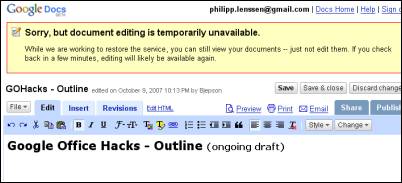
Google Docs is having some problems today, at least for some of us. Tadeusz earlier today reported he saw a 404 page at Google Docs. When I logged in, I received the message “The server encountered an error. Please try again later.” Then later, it started to work fine, but just now when opening a document I got the following message:


Sorry, but document editing is temporarily unavailable.

While we are working to restore the service, you can still view your documents – just not edit them. If you check back in a few minutes, editing will likely be available again.


[Thanks Tadeusz!]

Google Vanity Ring and More


Created by Markus Kison of Berlin University for Digital Media, the VanityRing displays the Google page count the wearer gets for their own name. It’s the ultimate status symbol but updated for the 2000s, beating even costly jewels. “Being in people’s mind means being important,” Markus says.


To raise your Google status even more, there are two new options from the Google store: Google lip balm and Google Rubik’s cube.


[Top link & pic via Digg and Manoj. Top image by Markus, second image by Google Store.]

Top Blogs On Google Reader

So Google recently made it fairly easy to determine the number of Google Reader subscribers around a particular blog. Gabe Rivera at Techmeme did a little work on excel and came up with an unofficial list of the top blogs and the number of subscribers each blog has on Google Reader. He sent the list around to people for comments - with his permission we’ve published it below.


This isn’t perfect because you have to think of the blog and then do a search for the stats; so some blogs may be left off. Also, some of these stats are aggregate numbers from different feeds for the same blog.

If you see errors or blogs that should be added, please point them out and we’ll correct them. It would also be good to round this out to a top 100 list and compare it to Technorati and TechMeme Leaderboard . Hopefully, Google will just publish this data themselves at some point.


The blog or other news site is listed on the left. Total Google Reader subscribers is listed in the second column.


Sunday, October 14, 2007

Making JavaScript Safe with Google Caja

Douglas Crockford continues to bang the drum for securing JavaScript in his latest post:

It is possible to make secure programming languages. Most language designers do not consider that possibility. JavaScript’s biggest weakness is that it is not secure. That puts JavaScript in very good company, but it puts web developers in an untenable position because they cannot build secure applications in an insecure language. JavaScript is currently going through a redesign that is again failing to consider the security of the language. The new language will be bigger and more complex, which will make it even harder to reason about its security. I hope that that redesign will be abandoned.

A more fruitful approach is to remove insecurity from the language. JavaScript is most easily improved by removing defective features. I am aware of two approaches that allow us to build secure applications by subsetting the insecure language.

The first approach is to use a verifier. That is how ADsafe works. A verifier statically analyzes a program, and certifies that the program does not use any of the unsafe features of the language. This does not guarantee that the program is safe, but it makes it possible to make programs that are safe. Any program can compromise its own security. The improvement here is that a program’s security is not compromised by the language it is written in.

The second approach is to use a transformer. A transformer verifies, but it also modifies the program, adding indirection and runtime checks. The advantage of transformers is that they allow the use of a larger subset of the language. For example, ADsafe does not allow the use of the this parameter. A transformer can allow this because it can inject code around it and its uses to ensure that it is never used unsafely. The benefit is that it is more likely that existing programs could run in a safe mode with little or no modification. I think that is a dubious benefit because programs that are not designed to be safe probably are not. The downside is that the final program will be bigger and slower, and debugging on the transformed program will be more difficult.

Both approaches work. But we still need to fix the browser.

A new project, Google Caja, is trying to do source-to-source translation to secure things:


Using Caja, web apps can safely allow scripts in third party content.

The computer industry has only one significant success enabling documents to carry active content safely: scripts in web pages. Normal users regularly browse untrusted sites with Javascript turned on. Modulo browser bugs and phishing, they mostly remain safe. But even though web apps build on this success, they fail to provide its power. Web apps generally remove scripts from third party content, reducing content to passive data. Examples include webmail, groups, blogs, chat, docs and spreadsheets, wikis, and more.

Were scripts in an object-capability language, web apps could provide active content safely, simply, and flexibly. Surprisingly, this is possible within existing web standards. Caja represents our discovery that a subset of Javascript is an object-capability language.

FBJS is also trying to do some of this too. Got some time on Friday to look around some code? Take a look at some Caja.

Toplist